The OpenAI API Platform#
Learning Objectives:
Navigate the OpenAI API platform and create API keys
Set spend limits to control costs
Track usage across models and projects
Platform Overview#
The OpenAI API platform at platform.openai.com is your control center for building with OpenAI models. It’s separate from ChatGPT — the platform is where you manage API keys, monitor usage, set budgets, and test models programmatically.
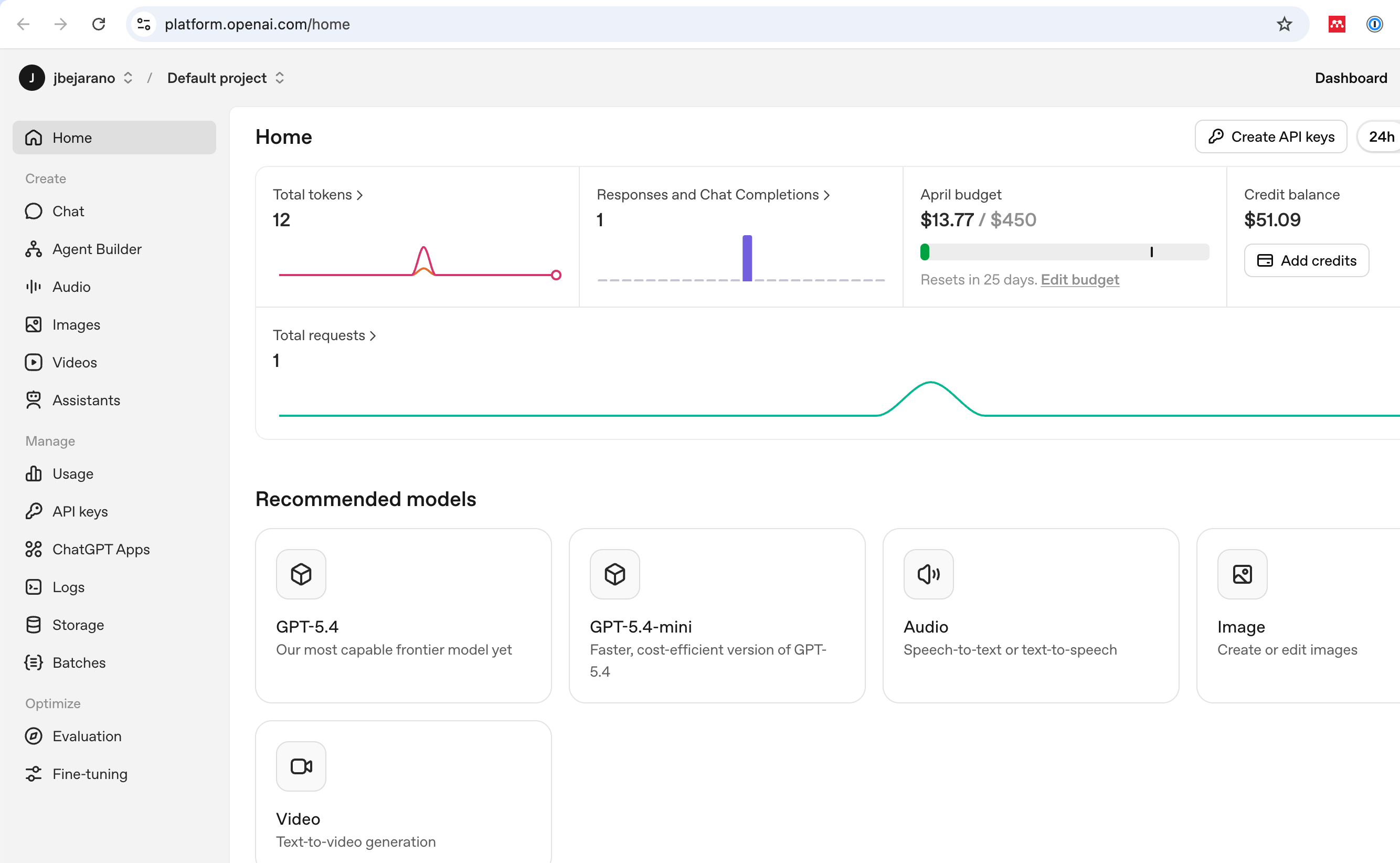
The OpenAI API platform home page. The dashboard shows token usage, request counts, your monthly budget, and credit balance. The left sidebar organizes tools into Create (Chat, Agent Builder, Images) and Manage (Usage, API keys, Batches).
Key areas in the sidebar:
Section |
What It Does |
|---|---|
Chat |
Test prompts interactively (like ChatGPT but with API parameters) |
API keys |
Create and manage your secret keys |
Usage |
Monitor spending, tokens, and requests |
Batches |
Track asynchronous batch processing jobs |
Getting Started: API Keys#
To make API calls, you need an API key. Go to API keys in the left sidebar and click Create API key.
Important security rules:
Never commit API keys to git. Add
.envto your.gitignore.Store keys in environment variables or a
.envfile.If a key is leaked, revoke it immediately from the platform.
The code examples in this course use python-decouple to load keys from a .env file at the repository root:
Full code: 02_openai_hello on GitHub
from decouple import Config, RepositoryEnv
from openai import OpenAI

# Load API key from .env file
config = Config(RepositoryEnv(".env"))
client = OpenAI(api_key=config("OPENAI_API_KEY"))
Your .env file should look like:
OPENAI_API_KEY=sk-proj-...
Setting a Spend Limit#
Before writing any code, set a monthly budget. In the dashboard screenshot above, notice the April budget: \(13.77 / \)450. This is a hard cap — once you hit it, API calls will fail rather than silently running up a bill.
To set your budget:
Go to Settings (gear icon, top right)
Navigate to Billing > Budgets
Set a monthly limit
Why this matters: A single misplaced while True loop calling GPT-4o can burn through credits fast. A $10-50 monthly budget is plenty for coursework. You can always increase it later.
Tracking Usage#
The Usage page gives you a detailed breakdown of your API spending.
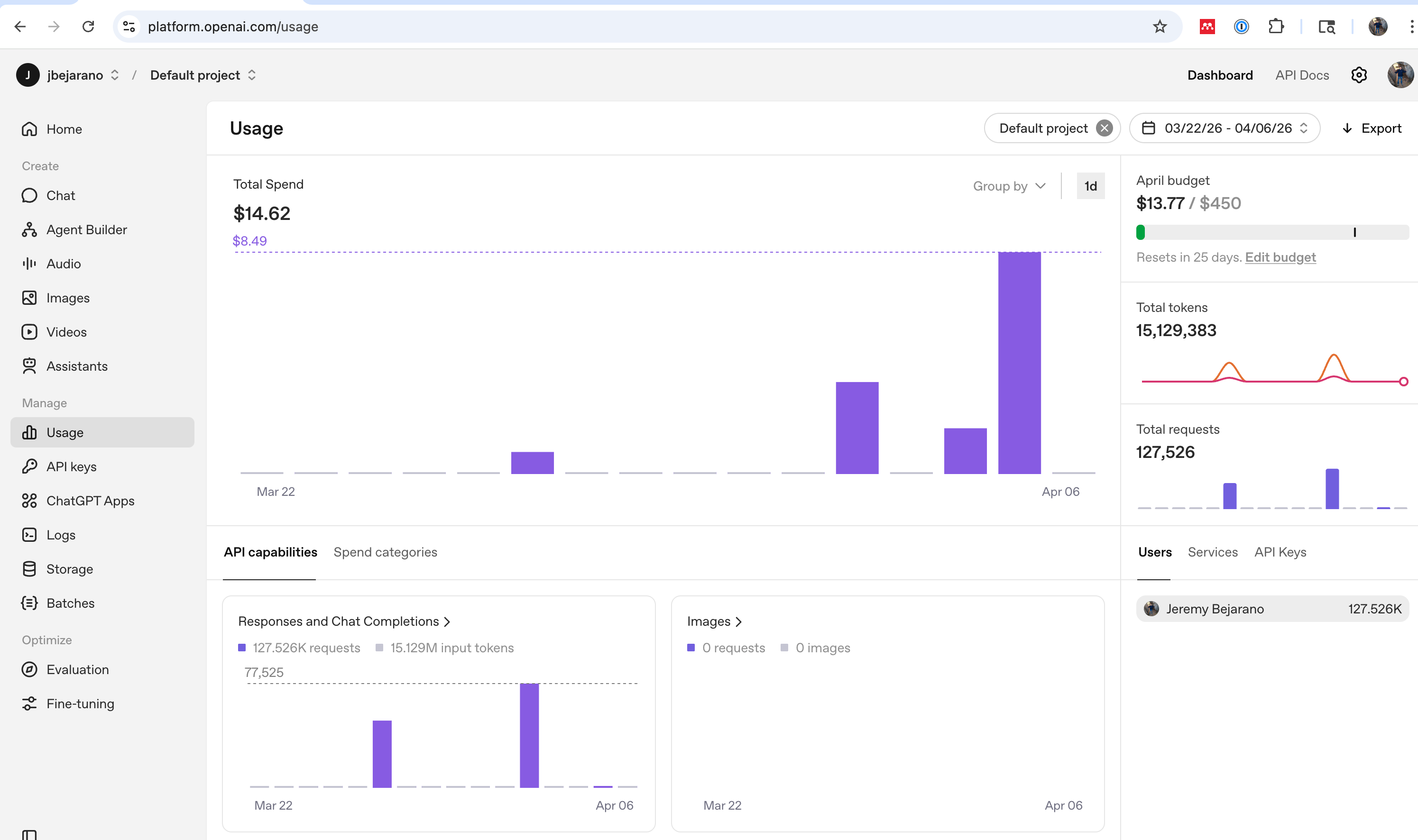
The Usage page shows total spend, token counts, and request volume over time. You can filter by date range, project, and API capability. The breakdown by API capabilities (Responses and Chat Completions, Images, etc.) helps identify where your budget is going.
Key metrics to monitor:
Total Spend: Your dollar cost for the selected period
Total Tokens: Combined input + output tokens across all requests
Total Requests: Number of API calls made
Spend by capability: See if costs come from text generation, images, or other services
Model Pricing#
To estimate cost, multiply tokens by the model’s pricing:
Model |
Input (per 1M tokens) |
Output (per 1M tokens) |
|---|---|---|
GPT-4o-mini |
$0.15 |
$0.60 |
GPT-4o |
$2.50 |
$10.00 |
GPT-4.1 |
$2.00 |
$8.00 |
GPT-4.1-mini |
$0.40 |
$1.60 |
Tip
Start with gpt-4o-mini for development and testing. It’s fast and cheap. Only move to more expensive models once you’ve validated your approach works.
Key Takeaways#
Set a budget first. Before writing any API code, configure a monthly spend limit on the platform. This protects you from runaway costs.
Track usage. Use the platform’s Usage page to monitor spending by model, project, and date range.
Start cheap, scale up. Use
gpt-4o-miniduring development. Move to larger models only after validating your approach.